

Install on WordPress
The free Galytics plugin for WordPress adds the tracking script to every page of your site, so there is no theme code to edit.
Install the plugin
In your WordPress admin, go to Plugins > Add New Plugin, search for Galytics, click Install Now and then Activate.
You can also download it from the Galytics page on WordPress.org and upload the zip under Plugins > Add New Plugin > Upload Plugin.
Add your analytics token
Copy the token from your website's settings in Galytics, see Analytics token. In WordPress, go to Settings > Galytics, paste the token and click Save Changes.
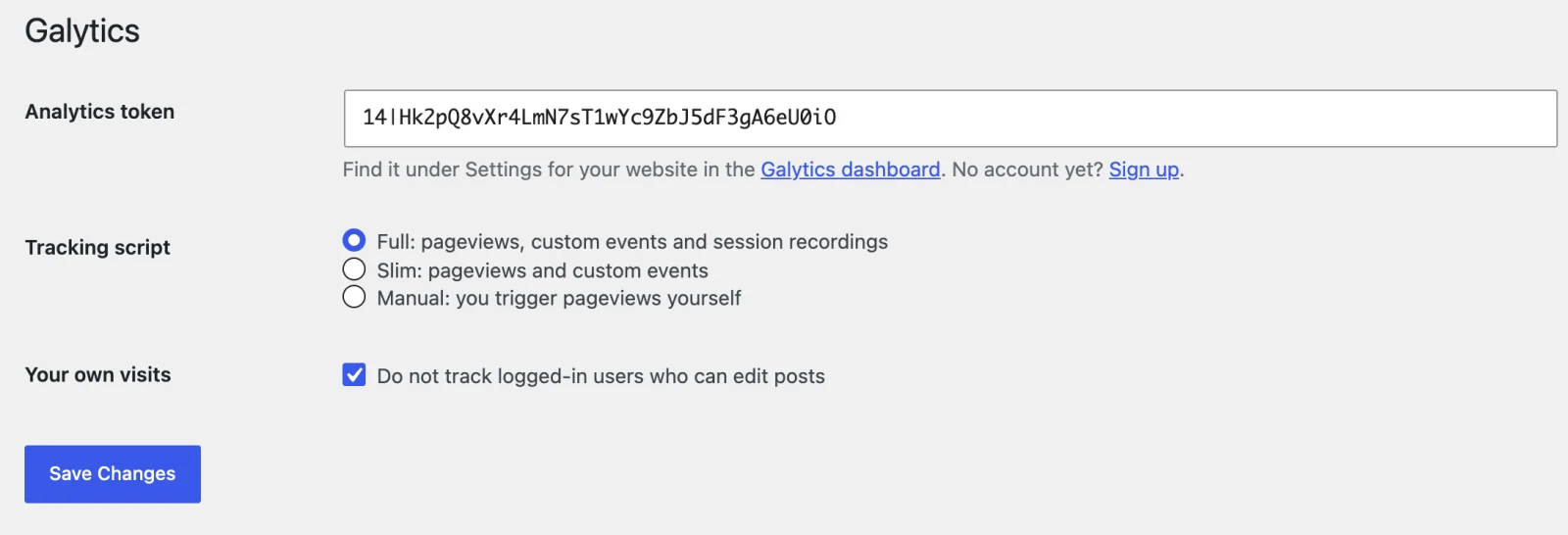
Choose a tracking script
The plugin offers the same three scripts as a manual install. Full records pageviews, custom events and session recordings. Slim records pageviews and custom events only, and is much smaller. Manual leaves it to you to trigger pageviews. See Add tracking script for the details.
Your own visits
By default, logged-in users who can edit posts are not tracked, so your own visits while you write and edit do not count. Untick Do not track logged-in users who can edit posts if you want them counted.
Check that it works
Open your site in a private browser window, so you are not logged in, then reload your Galytics dashboard. The visit shows up under Active visitors. If it does not, view the page source and look for galytics-script. If it is missing, check that the token is saved and the plugin is active.